Free Invoice Generator
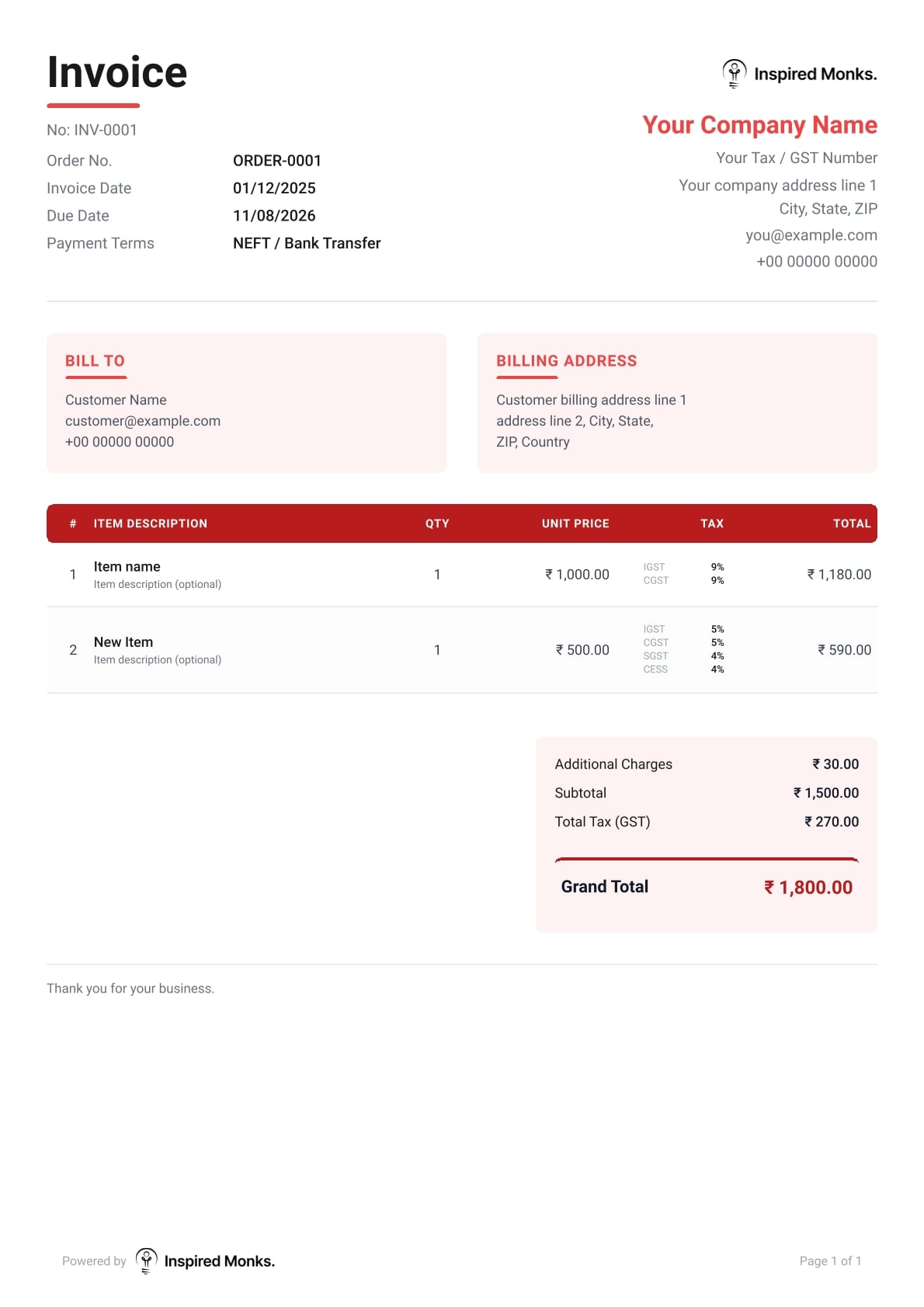
Create professional, tax-compliant invoices online in minutes with our Free Invoice Generator. No signup, no limits, and no hidden fees, just a fast, secure, and privacy-focused way to generate invoices with VAT, GST, and multi-currency support.


Create Professional invoices, bills, and receipts in Minutes
Features of the Inspired Monks Invoice Generator
No Sign-Up Required
Full Branding Control
Zero-Error Automated Math
Stop doing manual math. The tool auto-calculates quantities, rates, and discounts instantly. No spreadsheet formulas, just accurate totals.
Instant PDF Download
Global Multi-Currency Support
Smart Tax Handling
Fully compliant for local and international needs. Easily add GST, VAT, or Sales Tax percentages, and see the breakdown clearly on the final bill.
100% Client Data Privacy
We don't see your data. Everything you type is processed locally in your browser, keeping your client list and finances completely private.
Browser Auto-Save
One-Click Item Duplication
Drag-and-Drop Reordering
Need to change the order of your services? Just grab the handle and drag line items where you want them. No need to delete and re-type.
Flexible Line Discounts
Apply discounts directly to specific items or services. clearly showing your clients exactly how much they are saving builds trust and goodwill.
Custom Notes & Terms
Clarify how you want to be paid. Dedicated sections for bank details, payment terms (e.g., Net 30), or a simple "Thank You" note.
How to Make an Invoice for Free (3 Easy Steps)
Enter Business & Client Details
Add Products or Services
Download Your Invoice
Benefits
Why use our Secure Invoice Maker?
100% Private & Secure
Smart Tax & GST Compliance
Stop doing manual math on a calculator, our smart engine calculates the totals for you instantly to prevent costly billing errors.
Unlimited & Free
Frequently Asked Questions - Free Invoice Maker

Is this invoice generator really completely free to use?
Yes! The Inspired Monks free invoice generator is 100% free forever. No hidden charges, no watermarks, no restrictions, and no subscription upgrades required.
Do I need to create an account or sign up?
No. You can create invoices instantly without login, signup, or registration. Just fill your details and download your invoice.
Is my client data safe and private?
Your privacy is our top priority. This tool runs on Local Storage technology, which means all the data you enter (client names, amounts, bank details) stays strictly on your own device/browser. We do not upload or store your financial data on our servers. This makes it one of the most secure and private ways to generate invoices online.
Can I create a GST-compliant invoice for India?
Yes. This tool is fully optimized for Indian businesses and freelancers. You can easily add your GSTIN, your client’s GST number, and break down taxes into CGST, SGST, and IGST. The layout meets all standard requirements for a valid Indian tax invoice.
How do I add my company logo?
You can brand your invoice instantly. Click the “Upload Logo” area at the top of the template to select a PNG or JPG file from your computer. Your logo will be automatically resized and placed on the invoice header to give your documents a professional, corporate look.
Can I change the currency on my invoices?
Absolutely. We support over 150 global currencies. You can switch between US Dollar ($), Indian Rupee (₹), Euro (€), British Pound (£), and many others using the currency dropdown menu. When you switch currencies, the tool automatically adjusts the formatting (decimal points and symbols) to match that region’s standards.
How do the taxes work with different currencies?
Our smart tax system automatically adjusts based on your selected currency:
- INR (Indian Rupee) → Shows GST options (IGST, CGST, SGST, CESS)
- USD (US Dollar) → Shows Sales Tax
- EUR (Euro) & GBP (British Pound) → Shows VAT
- Other currencies → Shows generic tax percentage field
How do I save or manage multiple invoices?
Since we do not store your data on cloud servers (for your privacy), we cannot provide a “dashboard” of past invoices. We recommend downloading every invoice as a PDF immediately after creating it and saving it to a dedicated folder on your computer.
Is there a limit to how many line items I can add?
There is no limit. You can add as many products or services as required. The invoice generator will automatically expand, and if the list is very long, it will organize the content neatly. The mathematical totals will update instantly regardless of how many items you add.
Can I edit the invoice after downloading the PDF?
Once downloaded, the PDF is a secure, read-only document (which is best for billing). If you spot a mistake, simply go back to the browser tab. Because we use browser memory, your details should still be there. Correct the error and download the PDF again.
Can I integrate this with accounting software like QuickBooks or GST portals?
This is a standalone tool designed for speed and simplicity, so it does not directly “sync” with software like QuickBooks or Tally. However, the PDF format is standard and accepted by all accounting departments. You can download the invoice and email it to your accountant or upload the PDF to your GST portal manually.
Can I use this as a Purchase Order, Bill or Receipt Generator?
Yes. This tool is a versatile online bill generator. If you need to issue a receipt for payment received, simply change the title field from “INVOICE” to “RECEIPT” or “BILL”. It functions perfectly as a receipt maker for freelancers and small businesses.
Create Professional Invoices Instantly with the Best Free Invoice Maker
In the fast-paced world of freelancing and small business, getting paid on time starts with a professional invoice. Whether you are a consultant, a contractor, or a small business owner, the administrative headache of billing clients can eat into your productive hours. That is why we built the Inspired Monks Free Online Invoice Generator—a powerful, secure, and 100% free tool designed to streamline your billing process without the need for complicated software or expensive subscriptions.
If you are looking for a free invoice maker that requires no signup, creates instant PDF invoices, and supports global tax standards like GST and VAT, you have landed on the right page. Below, we explore how to use this tool, why it is better than Excel templates, and how to master the art of invoicing.
Why Use an Online Invoice Generator Instead of Templates?
For years, businesses relied on static files—searching for a “free invoice template word” or “bill generator excel”—only to realize the limitations. Static templates are prone to calculation errors, formatting issues, and they look outdated.
Here is why switching to a dynamic online invoice generator is the smart move:
- Automatic Math: Stop doing manual calculations. Our tool automatically sums up your line items, applies the correct tax percentages, and calculates the grand total.
- Professional Formatting: An invoice maker ensures your layout is clean, aligned, and print-ready every time.
- Mobility: Generate invoices online from any device. You do not need Microsoft Office installed to create a bill.
- Speed: You can create and download a PDF in under 60 seconds.
How to Make an Invoice: A Step-by-Step Guide
Using this invoice creator is intuitive. You do not need accounting knowledge. Follow these simple steps to create an invoice free of charge:
1. Add Your Business Branding
First, establish trust. Click the “Upload Logo” box to add your company branding. A logo makes your document look like a professional invoice, increasing the likelihood of prompt payment. Fill in your “From” details, including your business name, address, and contact info.
2. Enter Client Details
In the “Bill To” section, enter your client’s information. If you are using this as a receipt generator for a past payment, ensure the client’s data matches their billing records exactly.
3. Invoice Details & Dates
Assign a unique Invoice Number. This is crucial for tax compliance and tracking. Set the Date of Issue and the Due Date.
- Tip: If you want to use this tool as a quote generator, you can adjust the terminology in the custom fields (if applicable) or simply note it in the terms.
4. List Your Services (The Bill Generator)
This is the core of the bill generator free function. Add your line items. Be descriptive. Instead of just writing “Service,” write “Web Development – Homepage Design.”
- Quantity & Rate: Enter the hours worked or quantity of products sold.
- Amount: The tool will auto-calculate the total for that line.
5. Apply Taxes and Discounts
Our tool is a global solution. Whether you need a GST invoice generator for India, a VAT invoice for Europe, or a Sales Tax invoice for the US, you can adjust the tax settings.
- Tax: Enter your local tax percentage (e.g., 18% GST).
- Currency: Switch between USD ($), INR (₹), EUR (€), GBP (£), and over 150 other currencies. The layout adjusts automatically.
6. Download Invoice as PDF
Once verified, click the “Download PDF” button. Your free invoice template PDF is generated instantly. You can now email this file to your client or print it for your records.
Key Features of Our Free Invoice Generator
We designed this tool to compete with the best free invoice generator apps on the market, but with one major difference: Privacy.
1. No Signup Required (100% Private)
Most online invoice maker tools force you to register, giving them your email and data. We don’t. This is a no signup tool. We use Local Storage technology, meaning your data is saved on your browser, not our servers. Your client list and financial data remain yours alone.
2. Receipt Generator Capabilities
While primarily an invoicing tool, it functions perfectly as a free online receipt generator. Simply change the header title from “INVOICE” to “RECEIPT” (if editable) or add a note in the footer saying “Paid in Full.” It serves as a legitimate proof of payment.
3. Global Currency & Tax Support
Whether you need a wise invoice generator alternative for international payments or a local utility bill generator style format for reimbursements, the multi-currency support handles it all.
4. PDF Invoice Generator
The output is always a high-quality PDF. Unlike Word documents which can be edited by the recipient, a PDF invoice is secure and preserves your formatting on any device, ensuring you look professional.
Invoice vs. Receipt vs. Bill: What Generator Do You Need?
Search engines show people look for bill generator, receipt maker, and invoice creator interchangeably. However, they are different documents. Here is how our tool adapts to each:
- Invoice: A request for payment.
- Bill: Usually received by a customer.
- Receipt: Proof of payment.
Who Is This Invoice Maker For?
- Freelancers
- Contractors
- Small Businesses
- Landlords
Tips for Getting Paid Faster
- Be Detailed
- Set Clear Terms
- Send Immediately
- Include Payment Methods
Frequently Asked Questions
Is this truly a free invoice generator?
Yes…
Can I make an invoice on my phone?
Yes…
Does it support GST invoicing?
Yes…
Can I use this as a Purchase orders, Bill or Receipt Generator?
Yes, this tool functions as a free bill generator for freelancers and can also serve as a receipt maker by simply changing the header text from ‘Invoice’ to ‘Receipt’
Conclusion
Stop wasting time with spreadsheets. Upgrade your billing process with the Inspired Monks Free Online Invoice Generator. It is the fast, secure, and professional way to create an invoice free and keep your cash flow healthy.
Bookmark this page and never struggle with manual billing again. Ready to get paid? Scroll up and generate your first invoice now!
